Book Cover Interior Pages Mockup Display
In the crowded digital landscape of publishing and design, a static image often fails to capture the true essence of a book. Readers and potential buyers need to feel the weight of the pages and the texture of the cover before they commit to a purchase or a download. This is where the Book Cover Interior Pages Mockup Display becomes an indispensable tool for creators who want to present their work with professional polish. Unlike flat JPEGs that sit lifelessly on a screen, this mockup offers a dynamic perspective, showcasing not just the front face but also the interior spread, giving a genuine sense of depth and realism.
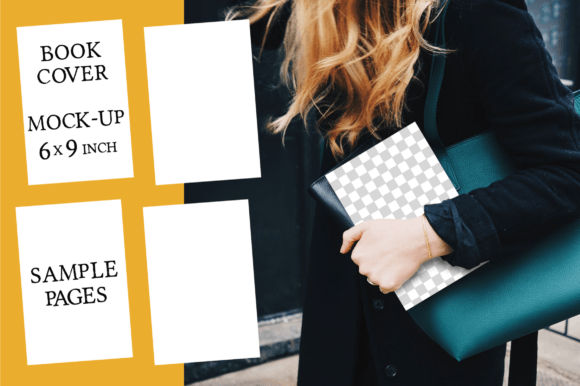
The visual appeal of this specific 6x9 inch display lies in its ability to bridge the gap between a digital file and a physical object. It mimics the natural curve of pages turning, the shadow cast by the spine, and the way light interacts with paper. For anyone involved in editorial design, whether you are self-publishing a novel or designing a workbook, this asset transforms a simple layout into a tangible product. The personality of the mockup is clean, modern, and versatile, allowing it to adapt seamlessly to various genres without overpowering your own design work.
Elevating Your Book Presentation Without Photoshop
One of the most significant barriers for many authors and small business owners is the technical hurdle of creating high-quality marketing assets. Professional-grade software like Adobe Photoshop can be expensive and has a steep learning curve. However, the Book Cover Interior Pages Mockup Display is designed specifically to bypass these obstacles. By utilizing a smart object layer approach or simply dropping your design onto a transparent PNG, you can achieve studio-quality results using free tools like Canva, GIMP, or even PowerPoint.
This accessibility democratizes the quality of brand identity presentation. You no longer need to hire a graphic designer just to create a compelling image for your Amazon KDP listing or your personal website. The included PNG features a transparent background, which is a game-changer for creative flexibility. You can place the book over a photo of hands holding a coffee cup, resting on a wooden desk, or surrounded by crafting supplies like crayons and brushes. This contextual placement tells a story about who the book is for, making the marketing message far more effective than a generic white background ever could.
Strategic Applications Across Digital Platforms
The versatility of this display font alternative—this visual asset, rather than typography—is evident across multiple channels. For your online shop, high-resolution images are critical for conversion rates. A customer cannot touch the book, so the image must do the heavy lifting. Showing the interior pages helps them visualize the reading experience, which is particularly important for cookbooks, journals, or children's books where layout matters as much as the cover art.
- KDP Content: Use this mockup for your A+ content sections on Amazon. It breaks up walls of text and provides a visual anchor that keeps readers engaged.
- Social Media Graphics: Create eye-catching posts for Instagram or Pinterest. The 3000×2000 pixel resolution ensures the image remains crisp even when zoomed in on mobile devices.
- Online Portfolio: Designers can use this to showcase their typesetting skills. It demonstrates how well your serif font or sans serif font choices work within a real-world context.
- Blogs and Reviews: Bloggers reviewing books can use this to create custom graphics that stand out against standard publisher-provided covers.
Impact on Brand Perception and Audience Engagement
While this tool is technically a design asset, its impact ripples through your entire brand perception. In the world of modern typography and visual communication, consistency is key. When your book appears as a polished, three-dimensional object across all your platforms, it signals professionalism. It suggests that the content inside is equally well-crafted. Conversely, low-quality, flat images can subconsciously signal amateurism, causing potential buyers to scroll past.
The inclusion of interior pages adds another layer of trust. It invites the viewer to peek inside, reducing the uncertainty of what they are buying. This transparency builds engagement. When a reader sees how the text flows, how the margins look, or how illustrations are integrated, they are more likely to imagine themselves reading it. This psychological shift from passive viewing to active imagination is crucial for driving sales. Whether you are selling a premium font guide or a fiction novel, the presentation sets the stage for the value proposition.
Practical Guidance for Implementation
To get the most out of the Book Cover Interior Pages Mockup Display, start by ensuring your source files match the dimensions. The mockup is optimized for the standard 6x9 inch trade paperback size, which is the industry standard for novels and non-fiction. If your design includes bleed areas, ensure those are accounted for before placing your artwork into the template.
When evaluating project fit, consider the lighting and mood of the background you intend to use. Since the PNG has a transparent background, you have full control over the environment. Pair the book with elements that reflect your target audience. For a children's book, surround it with colorful toys; for a business guide, place it next to a laptop or notebook. This technique, often used in packaging design, creates an immediate association between the product and the user's lifestyle.
Testing is also essential. Before finalizing your marketing campaign, view the mockup on different devices. Check how the text on the cover reads on a small smartphone screen versus a desktop monitor. Ensure that the shadows and highlights on the mockup don't obscure any critical information on your book cover. While the file itself is a static image, the way you integrate it into your workflow requires a strategic eye for visual hierarchy.
Technical Specifications and Licensing Clarity
Understanding the technical details ensures a smooth workflow. The file provided is a single PNG at 3000×2000 pixels, offering high resolution suitable for both web and print applications. The large file size allows for cropping and zooming without losing quality, which is vital for creating variations for different social media aspect ratios. Please note that this is a digital product for instant download; no physical item will be shipped. Additionally, while the mockup is ready to use, any fonts displayed on the sample cover are not included in the download. You will need to apply your own creative font or handwritten font choices to complete the look.
Licensing is straightforward for most commercial uses. As a commercial font alternative in the realm of design assets, this mockup is intended to help you sell your own products. You can use it for your book covers, blog headers, and promotional materials. However, you cannot resell the mockup file itself as a standalone product or claim the design of the mockup as your own original creation. It is a tool to enhance your work, not the work itself.
By integrating the Book Cover Interior Pages Mockup Display into your creative process, you elevate the perceived value of your intellectual property. It is a small investment of time that yields significant returns in terms of professional presentation and audience connection. Whether you are a seasoned publisher or a first-time author, having a realistic, high-quality visual representation of your book is no longer optional—it is a necessity in the competitive digital marketplace. Happy crafting, and may your designs find the readers they deserve.