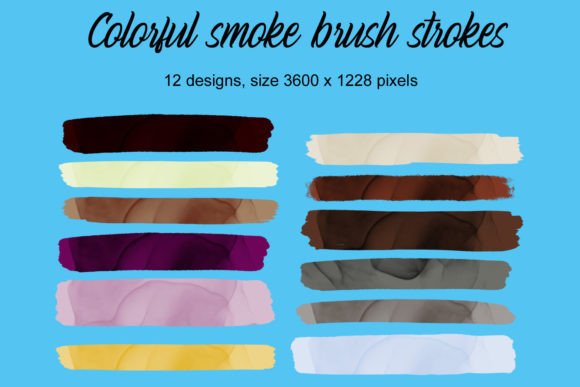
Colorful Smoke Brush Strokes: Elevating Your Digital Crafts
In the world of digital design, texture often makes the difference between a flat, generic image and a piece that feels alive. Colorful Smoke Brush Strokes offer exactly this kind of depth. This specific collection features twelve distinct brush strokes rendered in vibrant hues, each accented with subtle gold splotches. Whether you are designing elegant invitations, creating planner stickers, or preparing files for sublimation on mugs and tumblers, these elements add a touch of luxury and movement that standard shapes simply cannot achieve. However, like any digital asset, their potential is only unlocked when used correctly.
Many creators dive into new resources with enthusiasm but overlook the technical nuances that determine the final quality of their work. When working with textured assets like smoke and metallic accents, small oversights can lead to pixelated results, muddy colors, or designs that fail to translate well from screen to print. Understanding how to properly evaluate and apply these brushes is essential for anyone looking to maintain professional standards.
The Importance of Resolution and File Format
One of the most common pitfalls when using digital brush collections is ignoring the resolution requirements of your specific project. A brush stroke that looks crisp on a computer monitor might appear blurry or jagged when printed on a large invitation or stretched across a tumbler wrap. The Colorful Smoke Brush Strokes collection includes elements in various sizes, which is helpful, but it does not automatically guarantee scalability for every use case.
If you are working on physical products like mugs or tumblers via sublimation, you must ensure your base canvas is set to at least 300 DPI (dots per inch) before applying the brushes. If you place a low-resolution brush onto a high-resolution canvas without scaling it up appropriately, the software will interpolate the pixels, resulting in a fuzzy appearance. The gold splotches, in particular, rely on sharp edges to mimic the look of metallic foil. When these edges become soft due to poor scaling, the effect loses its premium feel and looks more like a smudge than a deliberate design choice.
To avoid this, always check the dimensions of your brush strokes relative to your final output size. If a brush stroke is too small for your design, do not simply stretch it. Instead, look for larger variants within the collection or create a composite by layering multiple strokes. This approach preserves the integrity of the texture and ensures the gold accents remain distinct and vibrant.
Understanding Color Profiles for Print vs. Screen
Another frequent misunderstanding involves color management. The vibrant colors found in the Colorful Smoke Brush Strokes are designed to pop on screens, which typically use the RGB (Red, Green, Blue) color model. However, if you are sending your design to a professional printer for invitations or scrapbook elements, the printer will likely require CMYK (Cyan, Magenta, Yellow, Key/Black) files.
When converting from RGB to CMYK, certain bright neon tones and deep purples can shift significantly, sometimes appearing duller than expected. The gold splotches present a unique challenge here. True metallic gold cannot be reproduced with standard CMYK inks; it requires a special foil stamping process or a specific spot color ink. If you treat the gold in the brush as a standard yellow-orange mix, the final print may lack the shimmer you envisioned.
A practical solution is to separate the gold elements from the colored smoke if your printing method allows for spot colors or foil application. If you are limited to standard four-color printing, adjust the saturation of the gold areas slightly downward during the conversion process to prevent them from turning into a muddy brown. Always request a proof from your printer before committing to a full run, especially when metallic effects are involved.
Context Matters: Matching Brushes to Mediums
While versatility is a selling point of this collection, not every brush stroke works equally well on every medium. Beginners often make the mistake of treating all digital assets as universally applicable. For instance, a thick, heavy smoke stroke might overwhelm a delicate wedding invitation font, while a thin, wispy line might get lost on a dark-colored tumbler.
Consider the background and the surrounding elements before selecting a stroke. On light backgrounds, the darker tones in the smoke collection provide excellent contrast. Conversely, on dark backgrounds, the lighter parts of the smoke and the gold accents need to be prominent enough to stand out. If the contrast is too low, the design can look unfinished or poorly executed.
For scrapbooking and planner stickers, where details are viewed up close, the intricate nature of the gold splotches adds significant value. In these cases, precision is key. Use tools that allow you to rotate and flip the strokes to fit the layout naturally rather than forcing them into a space where they don't belong. The goal is to enhance the composition, not clutter it. Remember that less is often more; using one or two well-placed strokes can be more effective than covering the entire page with colorful smoke.
Evaluating Licensing and Commercial Use
Before downloading or purchasing any digital asset, including the Colorful Smoke Brush Strokes, it is crucial to review the licensing terms. Many creators assume that once they buy a product, they can use it for anything, including resale items. However, licenses vary widely. Some allow personal use only, while others permit commercial use with restrictions on the number of end products you can sell.
If you are an entrepreneur planning to sell sublimation designs on mugs or custom invitations, ensure the license explicitly covers "commercial use" and "resale." Using a resource outside of its permitted scope can lead to legal issues and damage your brand's reputation. Always read the documentation provided with the download. If the terms are unclear, contact the creator directly for clarification. It is better to spend a few minutes verifying permissions than to risk losing sales or facing copyright claims later.
Practical Tips for Seamless Integration
To get the most out of this collection, integrate these brushes thoughtfully into your workflow. Start by testing the brushes on a blank canvas to see how they interact with different blending modes. Sometimes, changing the blend mode from "Normal" to "Multiply" or "Overlay" can make the smoke appear more integrated with the background text or images.
- Layering: Don't hesitate to layer different colored strokes to create depth. A lighter stroke behind a darker one can simulate distance and volume.
- Opacity Control: Adjust the opacity of the gold splotches if they feel too overpowering. Reducing opacity slightly can make them look more like a subtle glint rather than a solid block of color.
- Font Pairing: When using these brushes with fonts for invitations, choose typography that complements the organic flow of the smoke. Script fonts often pair beautifully with these textures, while bold sans-serifs can create a striking modern contrast.
By paying attention to resolution, color profiles, context, and licensing, you transform simple digital files into powerful design elements. The Colorful Smoke Brush Strokes are a valuable tool for elevating your creative projects, provided they are handled with care and technical awareness. With the right approach, you can produce high-quality invitations, stunning planner stickers, and eye-catching merchandise that stands out in a crowded market.