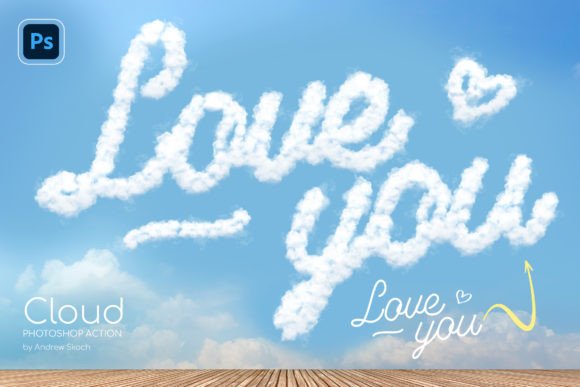
Transforming Text into Puffy Clouds: A Guide to the Cloud Photoshop Action
In the realm of digital graphic design, the ability to manipulate texture and form is often what separates a standard composition from a memorable visual statement. One particularly whimsical yet technically impressive effect involves transforming flat typography or vector shapes into voluminous, puffy clouds that appear to float against a realistic sky. This specific aesthetic has gained traction across various sectors, from romantic declarations to corporate congratulations, driven largely by the availability of specialized tools like the Cloud Photoshop Action. Understanding how this technology works, its practical applications, and the workflow it introduces can significantly enhance a creator's toolkit without requiring advanced manual masking skills.
The Mechanics of Digital Cloud Formation
At its core, the process of creating cloud-like text relies on complex layer manipulation and brush dynamics within Adobe Photoshop. Traditionally, achieving a realistic cloud effect required hours of manual painting, blending modes, and intricate masking to simulate the soft, irregular edges of cumulus formations. The introduction of automated workflows has streamlined this process. When utilizing a Cloud Photoshop Action, the software executes a pre-recorded sequence of commands that apply specific textures, gradients, and lighting effects to a selected layer.
The magic lies in the versatility of the action's algorithm. It does not merely stamp a cloud image over text; rather, it analyzes the shape of the input—whether it is a text layer, a vector logo, or a raster shape—and generates a three-dimensional cloud structure that conforms to that silhouette. The result is a seamless integration where the "cloud" appears to be made of water vapor, complete with highlights and shadows that suggest depth and volume. This transformation happens almost instantly, turning a simple black-and-white outline into a fluffy, atmospheric element.
Compatibility Across Layer Types
A significant advantage of modern cloud generation actions is their broad compatibility. Unlike older scripts that might only work with specific layer types, contemporary solutions are designed to handle a wide array of inputs. Users can apply the effect to:
- Text Layers: Ideal for messages, quotes, or names where legibility meets atmosphere.
- Vector Logos: Perfect for brands wanting to add a light, airy feel to their identity.
- Shape Layers: Useful for icons or abstract geometric forms.
- Layer Groups: Allowing for complex compositions where multiple elements are treated as a single unit.
- Raster Layers: Enabling the effect on imported images or hand-drawn sketches.
This flexibility ensures that the tool remains relevant for diverse projects, whether the goal is to create a personalized greeting card or a sophisticated marketing banner.
Simplifying the Creative Workflow
One of the primary barriers to entry for high-quality graphic design is the time investment required for detailed rendering. The Cloud Photoshop Action addresses this by offering a "one-click" solution that drastically reduces production time. The workflow is designed to be intuitive, even for those who may not consider themselves power users of Photoshop.
The process typically begins with opening a prepared PSD template. These templates are engineered to provide an immediate starting point, featuring a pre-configured sky background and a placeholder text layer. Upon opening the file, the user simply clicks on the text layer to select it. With the layer active, they execute the action through the Photoshop Actions panel. Within seconds, the flat text dissolves into a formation of puffy clouds, matching the perspective and lighting of the background sky.
This efficiency allows creators to iterate quickly. Because the action can be played multiple times within the same document, artists can build complex scenes with multiple words or logos, each rendered as distinct cloud formations. This capability transforms a static design into a dynamic composition where different elements interact visually within the same atmospheric space.
Practical Applications in Design and Communication
The utility of transforming text into clouds extends far beyond simple novelty. The soft, organic nature of cloud imagery carries specific emotional connotations that make it suitable for a variety of communication contexts.
Romantic Expressions and Celebrations
Perhaps the most common use case is in personal messaging. A declaration of love or a congratulatory message written in the sky using puffy clouds evokes feelings of dreaminess, hope, and lightness. For couples planning weddings, anniversaries, or proposals, this effect offers a unique way to visualize sentiments that traditional typography cannot convey. The imagery suggests that the message is as vast and enduring as the sky itself, adding a layer of poetic meaning to the visual content.
Brand Storytelling and Marketing
In a commercial context, the cloud effect can be used to soften a brand's image. Companies associated with travel, aviation, weather services, or children's products often benefit from this aesthetic. By converting a logo into clouds, a business can communicate values such as freedom, clarity, and approachability. Furthermore, because the action supports vector logos, the final output maintains professional quality, ensuring that the brand mark remains recognizable even when stylized.
Educational and Research Visuals
For educators and researchers, clear visual aids are essential. When explaining meteorological concepts or creating engaging presentations about the atmosphere, having the ability to generate realistic cloud text can capture attention more effectively than standard bullet points. It serves as a hook that draws the audience in, making the learning experience more immersive.
Technical Considerations and Customization
While the automation handles the heavy lifting, understanding the underlying components helps users maximize the potential of the Cloud Photoshop Action. The package usually includes several key files that contribute to the final result:
- ANT File (Action): The core script containing the recorded steps for the transformation.
- ABR File (Brushes): Specialized brushes that define the texture and edge softness of the clouds. These are critical for achieving the "puffy" look.
- PSD Template: The working environment that sets the stage with appropriate backgrounds and layer structures.
- PDF Guide: Documentation that provides instructions, font links, and troubleshooting tips.
An important feature for global users is the multilingual capability of the action. Since the effect is applied based on the shape of the layer rather than the specific characters used, the tool works seamlessly with any language. Whether the text is in English, Chinese, Arabic, or Spanish, the cloud generation adapts to the glyph shapes, making it a truly universal design asset.
Furthermore, the non-destructive nature of the workflow allows for adjustments. If the initial result requires tweaking, users can often adjust the opacity, blending modes, or color balance of the resulting cloud layers to better match their specific project needs. This level of control ensures that the automated effect does not limit creative expression but rather enhances it.
Building Complex Compositions
Advanced users can leverage the repeatability of the action to create intricate scenes. Imagine a poster where the headline, subhead, and decorative elements are all rendered as clouds, floating at different altitudes against a sunset sky. By playing the action multiple times on different layers, a designer can construct a cohesive narrative where every textual element contributes to the atmospheric mood.
This capability is particularly useful for creating social media graphics, where visual impact must be achieved instantly. A series of posts featuring different phrases in the clouds can maintain a consistent visual theme while varying the message. The ease of use means that these variations can be produced rapidly, keeping content fresh and engaging without the need for extensive manual editing.
Conclusion on Modern Design Efficiency
The evolution of tools like the Cloud Photoshop Action represents a broader trend in digital creativity: the democratization of high-end effects. What once required expert-level skills in digital painting and compositing is now accessible to hobbyists, students, and professionals alike. By focusing on usability and versatility, these tools empower creators to focus on the message and the emotion behind the design rather than getting bogged down in technical execution.
Whether the goal is to send a heartfelt message written in the sky or to create a striking visual for a business campaign, the ability to transform text into puffy clouds offers a unique blend of artistry and efficiency. As design trends continue to favor organic, natural aesthetics, mastering such automated workflows will remain a valuable skill for anyone looking to make their mark in the visual landscape.